고정 헤더 영역
상세 컨텐츠
본문
list item을 클릭하면 해당 item에 맞는 object정보를 담은 modal을 띄우고, 그 안에 정보들을 표시해보도록 합니다.
JavaScript 기초 지식이 없어서 쩔쩔 해맸음ㅜㅜ
🤔 어디까지나 제가 대충 이해한 내용으로 정리했을 뿐, 정확하지 않습니다..!
우선 modal은 다른 컴포넌트로 분리합니다.
function Modal() {
  return (
    <WrapModal>
      <WrapModalTitle>
        <ModalTitle>제목</ModalTitle>
        <ModalText>종류</ModalText>
        <ModalIcon>❌</ModalIcon>
      </WrapModalTitle>
      <WrapModalInfo>
        <ModalText>📌: 주소</ModalText>
        <ModalText>📞: 전화번호</ModalText>
        <ModalText>📆: 방문일</ModalText>
      </WrapModalInfo>
    </WrapModal>
  );
}
Modal컴포넌트는 list들이 map()을 통해 나열되도록 만든 부분 아래에 두었습니다.
  return (
    <div className="App">
      <Menu>
        <Logo>블로그</Logo>
      </Menu>
      <ContentSection>
        <ContentTitle>남천동 맛집리스트</ContentTitle>
        <button onClick={handleSort}>정렬변경</button>
        {contents.length > 0 ? (
          contents.map((content, index) => (
            <Post key={index}>
              <PostTitle>
                {content.title}
              </PostTitle>
              <PostCratedAt>{content.visitedAt}</PostCratedAt>
            </Post>
          ))
        ) : (
          <div>콘텐츠가 없습니다.</div>
        )}

        <Modal />
    </div>
  );
지금은 모달이 항상 보여지는 상태입니다.
useState를 사용하여 list item (코드상 PostTitle) 을 클릭하면 모달이 뜨도록 만듭니다.
  const [isOpen, setIsOpen] = useState(false);

  ...

  const handleClick = () => {
    setIsOpen(!isOpen);
  };

  ...

  <PostTitle onClick={handleClick}>

  ...

  {isOpen === true ? (
        <Modal {...listSelected} setIsOpen={setIsOpen} />
      ) : null}
isOpen, setIsOpen state를 만들고, 기본은 false로.
isOpen이 true 일 경우에만 Modal 컴포넌트가 렌더되고, 그렇지 않으면 null입니다.
PostTitle 컴포넌트에 onClick함수를 넣습니다. 이름은 handleClick.
handleClick은 setIsOpen을 통해 isOpen의 역, 즉 기본 false의 역인 true로 바꿔줍니다.
여기까지는 쉬웠는데,
props를 다른 컴포넌트로 보내주고,
내가 클릭한 그 list item과 상응하는 object정보를
그 다른 컴포넌트로 보내주는 것이 너무 이해가 안되고 어려웠습니다 ㅠㅠ
일단 시작.
내가 클릭한 그 list item이 누구인지부터 useState를 사용해 정해줍니다.
걔는 일단 object니까 기본은 비어있는 obeject({}).
const [listSelected, setListSelected] = useState({});그리고 그 list를 클릭하면 setListSelected를 해줍니다.
근데 그 set할 때 무엇(!)을 set할거냐가 문제입니다.
솔직히 순서가 이게 맞는지 잘 모르겠습니다만ㅠㅠ
list를 보여줄 때, contents를 map()을 돌며 단일 content로 쪼개서 그 개수만큼 list item을 보여줬습니다.
그 content를 PostTitle에 있는 onClick 함수, 즉 handleClick에 보내줍니다.
<PostTitle onClick={() => handleClick(content)}>그러면 클릭하면 그 content정보를 받겠지요.
그래서 상기 handleClick 함수에 content를 파라미터로 넣고,
setListSelected에 content를 보내 그 정보가 listSelected에 담기도록 합니다.
  const handleClick = (content) => {
    setIsOpen(!isOpen);
    setListSelected(content);
  };
이로써 내가 클릭한 list item에 상응하는 정보(content)가 넘어가게끔 만들도록은 했습니다.
그럼 이제 Modal 컴포넌트가 그 content를 받아서, 그 내용을 잘 보여주게끔만 하면 됩니다.
여기서 props가 등장합니다. 정보를 다른 컴포넌트로 보내줘야하니까요.
그 정보(content)는 지금 setListSelected를 통해 set 되어 listSelected에 있습니다.
<Modal {...listSelected} setIsOpen={setIsOpen} />이렇게 해서 props도 보내줍니다. 하는김에 setIsOpen도 보내서 Modal 컴포넌트 내 X아이콘 클릭 시 창도 닫게 만듭니다.
Modal 컴포넌트로 돌아가서,
이제 이 친구가 props로 받는 구체적인 정보들을 적어줍니다.
기본적으로 contents 는 여러 object로 구성된 array이고,
그것을 map()을 사용해서 단일 content object로 보았을때,
그 내부에는 id, title, sort, call, address, visitedAt의 정보가 있습니다.
이들을 Modal컴포넌트가 받는 props로 나열해줍니다.
function Modal({ setIsOpen, title, sort, call, address, visitedAt }) {
  return (
    <WrapModal>
      <WrapModalTitle>
        <ModalTitle>{title}</ModalTitle>
        <ModalText>{sort}</ModalText>
        <ModalIcon onClick={() => setIsOpen(false)}>❌</ModalIcon>
      </WrapModalTitle>
      <WrapModalInfo>
        <ModalText>📌: {address}</ModalText>
        <ModalText>📞: {call}</ModalText>
        <ModalText>📆: {visitedAt}</ModalText>
      </WrapModalInfo>
    </WrapModal>
  );
}
결과물
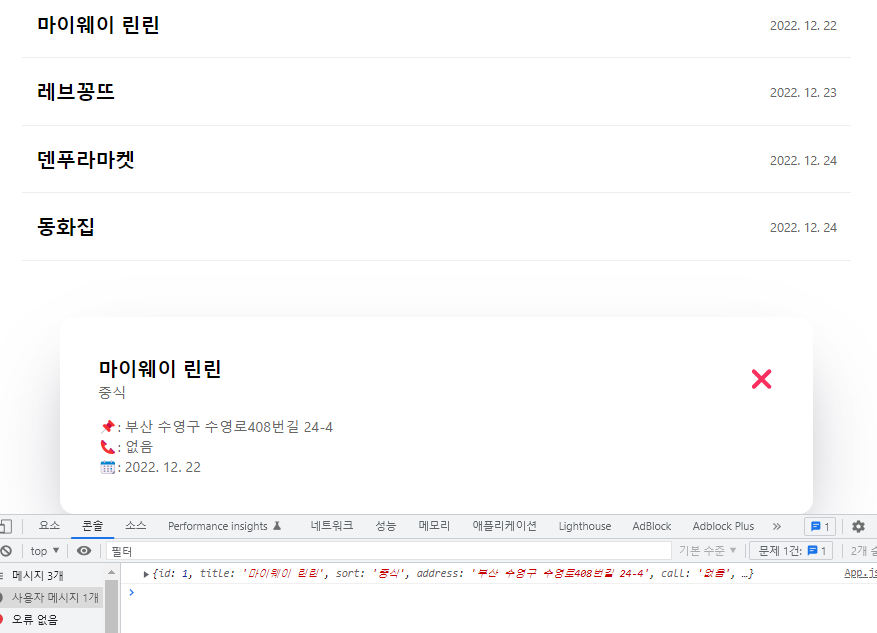
handleClick함수에 console.log(content)로 내가 클릭한 해당 list item의 content정보 또한 표시했습니다.
다른 list item을 클릭해도 잘 뜨고, 닫기 버튼도 잘 작동합니다.
참고한 글
Open the Modal when we click on First Item from the list using React
I have Few list of values and I am iterating through Map to display the Data, Now I am getting the list of Data, But here I need to open the modal when I click on First Item of the list.. So here...
stackoverflow.com
'Study with me' 카테고리의 다른 글
| [React] localStorage 사용해 List 데이터 JSON으로 저장하기 (0) | 2023.01.02 |
|---|---|
| [React] List 에 새로운 object인 항목 추가하기 w/ useState, onClick and inputs (0) | 2022.12.29 |
| [React] 리스트 타이틀 정렬하기 w/ sort() & useState (0) | 2022.12.26 |
| TypeScript 타입스크립트 - Type assertions (0) | 2022.09.20 |
| TypeScript 타입스크립트 - Type Inference (0) | 2022.09.18 |


