고정 헤더 영역
상세 컨텐츠
본문
Object로 이루어진 Array를 map()을 사용하여 리스트를 만들었다.
const posts = [
  {
    id: 1,
    title: "마이웨이 린린",
    sort: "중식",
    address: "부산 수영구 수영로408번길 24-4",
    call: "",
    createdAt: "2022. 12. 22",
  },
  {
    id: 2,
    title: "레브꽁뜨",
    sort: "카페",
    address: "부산 수영구 수영로408번길 32",
    call: "051-611-4127",
    createdAt: "2022. 12. 23",
  },
  {
    id: 3,
    title: "덴푸라마켓",
    sort: "분식",
    address: "부산 수영구 수영로388번길 6",
    call: "051-622-1522",
    createdAt: "2022. 12. 24",
  },
];

...

function App() {
  const contents = posts

  return (
    <div className="App">
      <Menu>
        <Logo>블로그</Logo>
      </Menu>
      <ContentSection>
        <ContentTitle>남천동 맛집리스트</ContentTitle>
        {contents.length > 0 ? (
          contents.map((content) => (
            <Post key={content.id}>
              <PostTitle>{content.title}</PostTitle>
              <PostCratedAt>{content.createdAt}</PostCratedAt>
            </Post>
          ))
        ) : (
          <div>콘텐츠가 없습니다.</div>
        )}
      </ContentSection>
      <button>정렬변경</button>
    </div>
  );
}

export default App;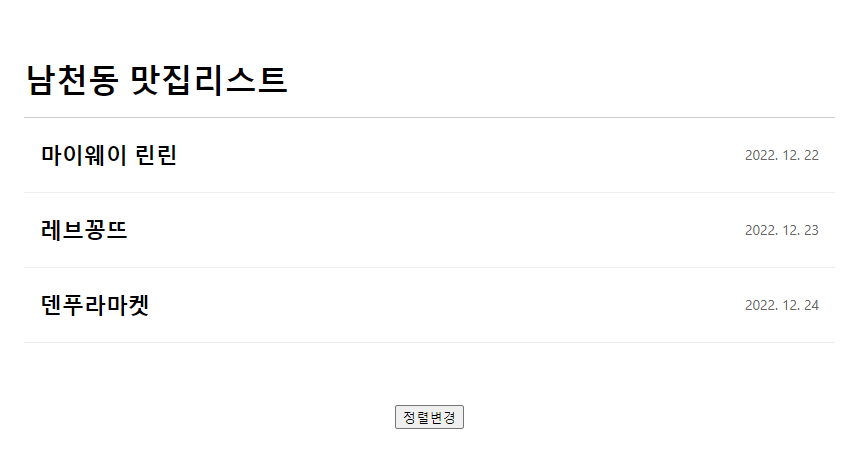
😍참고로 세 집 다 찐맛집이다!😍
여튼 여기서 하단의 정렬변경 버튼을 클릭해서 가나다순으로 정렬을 변경하고자한다.
const [contents, setContents] = useState(posts);

const handleSort = () => {
    const sortedContents = contents;
    sortedContents.sort((a, b) => {
      let titleA = a.title.toLocaleLowerCase();
      let titleB = b.title.toLocaleLowerCase();
      if (titleA < titleB) {
        return -1;
      } else if (titleA > titleB) {
        return 1;
      }
      return 0;
    });
    setContents([...sortedContents]);
  };

  ...

  <button onClick={handleSort}>정렬변경</button>
기존의 const contents = posts를 useState(posts)로 바꿔주고,
handleSort 함수 안에 가나다순으로 재정렬 될 배열을 sortedContents로 지정한다.
string sorting은 아래의 링크에서 참고했음.
https://www.javascripttutorial.net/array/javascript-sort-an-array-of-objects/
Sort an Array of Objects by Values of Object's Properites in JavaScript
In this tutorial, you will learn how to sort an array of objects by the values of the object's properties.
www.javascripttutorial.net
setContents에 sortedContents를 Spread Operator로 넣어준다.
이제 정렬변경을 클릭하면 가나다순으로 정렬이 된다.
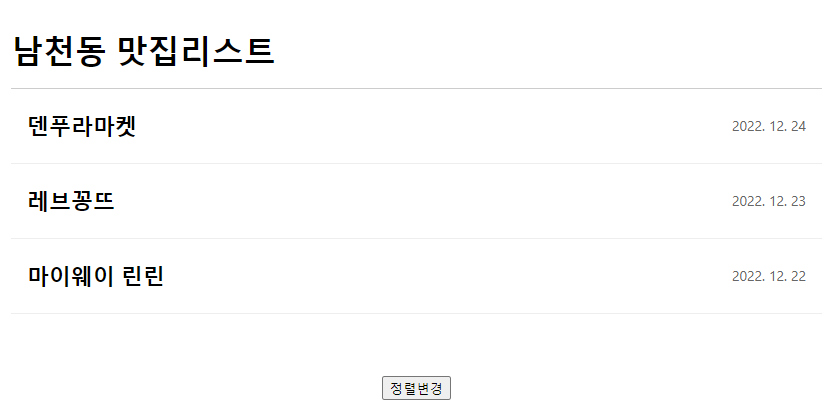
console.log(sortedContents);를 통해 보면 다음과 같다.

'Study with me' 카테고리의 다른 글
| [React] List 에 새로운 object인 항목 추가하기 w/ useState, onClick and inputs (0) | 2022.12.29 |
|---|---|
| [React] List 클릭 시 modal 띄우기 w/ props (0) | 2022.12.28 |
| TypeScript 타입스크립트 - Type assertions (0) | 2022.09.20 |
| TypeScript 타입스크립트 - Type Inference (0) | 2022.09.18 |
| TypeScript 타입스크립트 - Type annotations (0) | 2022.09.18 |


