고정 헤더 영역
상세 컨텐츠
본문
[ 배경 ]
아직 확정난 것은 아니지만, 향후 작업할수도 있는 기능인 금리 계산기.
공부할 겸해서 미리 시간있을 때 토이프로젝트로 이자계산기를 만들고 있다.
[ 개요 ]
- 적금, 예금, 대출 계산기를 만든다. 각 항목을 보여주는 방법으로 tab 기능을 사용한다.
- 이자계산법
- 적금: 단리
- 예금: 단리, 연복리
- 대출: 상환 방법으로 원리금 균등상환, 원금균등상환, 원금만기일시상환으로 나눈다.
- 금액을 적는 양식은 form 으로 감싸진 input태그를 사용한다.
- 이 때 가급적이면 접근성을 고려해 label을 꼭 사용한다.
- 세금계산법
- 일반과세: 15.4%,
- 비과세: 0,
- 세금우대: 우대세율 직접 적는 input
- 예치기간/대출기간
- 개월수 혹은 연수를 적을 수 있도록 한다.
- 결과물을 아래의 결과창을 통해 확인할 수 있도록 한다.
그럼 시작!
[ HTML ]
<div class="wrap">
        <section class="sec01">
            <h1>이자 계산기</h1>
            <ul class="type-finance">
                <li class="on"><a href="#installmentSaving" class="tab">적금</a></li>
                <li><a href="#depositSaving" class="tab">예금</a></li>
                <li><a href="#loan" class="tab">대출</a></li>
            </ul>
            <form id="installmentSaving" class="form-finance installment_saving on">
                <div class="saving_amount">
                    <label for="monthlySave">월적립액</label>
                    <input type="text" id="monthlySave" onchange="valueSavingAmount()">
                </div>
                <div class="saving_period">
                    <h2>적금기간</h2>
                    <ul class="wrap-saving_period">
                        <li>
                            <label for="periodMonth">개월</label>
                            <input id="periodMonth" type="radio" name="periodType" value="month" checked>
                        </li>
                        <li>
                            <label for="periodYear">년</label>
                            <input id="periodYear" type="radio" name="periodType" value="year">
                        </li>
                    </ul>
                    <input type="text" id="savingPeriod" class="input-saving_period">
                </div>
                <div class="type_interest">
                    <label for="interestRate">연이자율</label>
                    <input id="interestRate" type="text" name="interestRate">
                </div>
                <div class="type_tax">
                    <h2>이자과세유형</h2>
                    <ul>
                        <li>
                            <input id="regular" type="radio" value="일반과세" name="taxType" checked class="radio-type_tax">
                            <label for="regular">일반과세</label>
                        </li>
                        <li>
                            <input id="taxFree" type="radio" value="비과세" name="taxType" class="radio-type_tax">
                            <label for="taxFree">비과세</label>
                        </li>
                        <li>
                            <input id="preferential" type="radio" value="세금우대" name="taxType" class="radio-type_tax">
                            <label for="preferential">세금우대</label>
                        </li>
                        <li class="item-preferential_rate">
                            <label for="preferentialRate">우대세율</label>
                            <input id="preferentialRate" type="text" name="preferentialRate">
                        </li>
                    </ul>
                </div>

                <div class="wrap_btns">
                    <button type="button" class="btn-sm btn-cal" onclick="cal()">계산하기</button>
                    <button type="reset" class="btn-sm btn-reset">초기화</button>
                </div>
            </form>
            <form id="depositSaving" class="form-finance">
                <div class="saving_amount">
                    <label for="principal">예치금액</label>
                    <input type="text" id="principal" onchange="valueSavingAmount()">
                </div>
                <div class="saving_period">
                    <h2>예치기간</h2>
                    <ul class="wrap-saving_period">
                        <li>
                            <label for="depositPeriodMonth">개월</label>
                            <input id="depositPeriodMonth" type="radio" name="depositPeriodType" value="month" checked>
                        </li>
                        <li>
                            <label for="depositPeriodYear">년</label>
                            <input id="depositPeriodYear" type="radio" name="depositPeriodType" value="year">
                        </li>
                    </ul>
                    <input type="text" id="depositSavingPeriod" class="input-saving_period">
                </div>
                <div class="type_interest">
                    <h2>연이자율</h2>
                    <ul>
                        <li>
                            <input id="depositSimple" type="radio" value="단리" name="depositInterestRate" checked
                                class="radio-type-interest">
                            <label for="depositSimple">단리</label>
                        </li>
                        <li>
                            <input id="depositCompound" type="radio" value="연복리" name="depositInterestRate"
                                class="radio-type-interest">
                            <label for="depositCompound">연복리</label>
                        </li>
                    </ul>
                    <input id="depositInterestRate" class="input-deposit_interest_rage" type="text"
                        name="depositInterestRate">
                </div>
                <div class="type_tax">
                    <h2>이자과세유형</h2>
                    <ul>
                        <li>
                            <input id="depositRegular" type="radio" value="일반과세" name="depositTaxType" checked
                                class="radio-type_tax">
                            <label for="depositRegular">일반과세</label>
                        </li>
                        <li>
                            <input id="depositTaxFree" type="radio" value="비과세" name="depositTaxType"
                                class="radio-type_tax">
                            <label for="depositTaxFree">비과세</label>
                        </li>
                        <li>
                            <input id="depositPreferential" type="radio" value="세금우대" name="depositTaxType"
                                class="radio-type_tax">
                            <label for="depositPreferential">세금우대</label>
                        </li>
                        <li class="item-preferential_rate">
                            <label for="depositPreferentialRate">우대세율</label>
                            <input id="depositPreferentialRate" type="text" name="preferentialRate">
                        </li>
                    </ul>
                </div>

                <div class="wrap_btns">
                    <button type="button" class="btn-sm btn-cal" onclick="calDeposit()">계산하기</button>
                    <button type="reset" class="btn-sm btn-reset">초기화</button>
                </div>
            </form>
            <form id="loan" class="form-finance">
                <div class="loan_amount">
                    <label for="loanPrincipal">대출금액</label>
                    <input type="text" id="loanPrincipal" onchange="valueSavingAmount()">
                </div>
                <div class="loan_period">
                    <h2>대출기간</h2>
                    <ul class="wrap-loan_period">
                        <li>
                            <label for="loanPeriodMonth">개월</label>
                            <input id="loanPeriodMonth" type="radio" name="loanPeriodType" value="month" checked>
                        </li>
                        <li>
                            <label for="loanPeriodYear">년</label>
                            <input id="loanPeriodYear" type="radio" name="loanPeriodType" value="year">
                        </li>
                    </ul>
                    <input type="text" id="loanSavingPeriod" class="input-loan_period">
                </div>
                <div class="type_interest">
                    <label for="interestRate">대출금리</label>
                    <input id="interestRate" type="text" name="interestRate">
                </div>
                <div class="type_grace_period">
                    <h2>거치기간</h2>
                    <ul class="wrap-grace_period">
                        <li>
                            <label for="gracePeriodMonth">개월</label>
                            <input id="gracePeriodMonth" type="radio" name="gracePeriodType" value="month" checked>
                        </li>
                        <li>
                            <label for="gracePeriodYear">년</label>
                            <input id="gracePeriodYear" type="radio" name="gracePeriodType" value="year">
                        </li>
                    </ul>
                    <input id="gracePeriod" type="text" name="gracePeriod" class="input-grace_period">
                </div>
                <div class="type_payment">
                    <h2>상환방법</h2>
                    <select name="payment" id="payment">
                        <option value="원리금균등상환">원리금균등상환</option>
                        <option value="원금균등상환">원금균등상환</option>
                        <option value="원금만기일시상환">원금만기일시상환</option>
                    </select>
                </div>

                <div class="wrap_btns">
                    <button type="button" class="btn-sm btn-cal" onclick="calDeposit()">계산하기</button>
                    <button type="reset" class="btn-sm btn-reset">초기화</button>
                </div>
            </form>
            <div id="result" class="area_result">
                <div class="wrapper">
                    <dl>
                        <dt>원금합계</dt>
                        <dd><span id="spanTsa" class="total_saving_amount"></span>원</dd>
                    </dl>
                    <dl>
                        <dt>세전이자</dt>
                        <dd><span id="interestBfrTax"></span>원</dd>
                    </dl>
                    <dl>
                        <dt>세전 수령액</dt>
                        <dd><span id="depositBfrTaxing"></span>원</dd>
                    </dl>
                    <dl class="tax_interest">
                        <dt>이자과세</dt>
                        <dd><span id="interestTaxing"></span>원</dd>
                    </dl>
                    <dl>
                        <dt>세후 수령액</dt>
                        <dd><span id="netDeposit"></span>원</dd>
                    </dl>
                </div>
            </div>
        </section>
        <!-- .sec01 end -->
    </div>
[ CSS ]
:root {
  font-size: 16px;

  --clr-pink-light: #ffe7ff;
  --clr-pink: #ff9cd9;
  --clr-pink-deep: #e444a6;

  --clr-gray-light: #ddd;
  --clr-gray: #9e9e9e;
  --clr-gray-deep: #4d4d4d;

  --clr-blue-light: #e7f9ff;
  --clr-blue: #9ccfff;
  --clr-blue-deep: #44b1e4;

  --clr-red: #ff6363;
  --clr-red-deep: #dd2424;

  --clr-white: #fff;
  --clr-black: #1b1a1a;
}
html {
  font-size: 62.5%;
  line-height: 1.285;
}
* {
  margin: 0;
  padding: 0;
  box-sizing: border-box;
}

a {
  text-decoration: none;
  display: inline-block;
  color: var(--clr-black);
}

li {
  list-style: none;
  display: inline-block;
}

h1,
h2,
h3,
h4,
h5 {
  line-height: 2;
  font-size: 1rem;
}

button {
  border: none;
  background-color: transparent;
  cursor: pointer;
}

input {
  padding: 0.4rem 0.6rem;
  padding-right: 1.2rem;
  text-align: right;
}

.wrap {
  width: min(60%, 100%);
  margin-inline: auto;
  color: var(--clr-black);
}

.type-finance {
  display: flex;
}

.type-finance li .tab {
  padding: 0.4rem 0.8rem;
  background-color: var(--clr-pink-light);
}
.type-finance li.on .tab {
  background-color: var(--clr-pink-deep);
  color: var(--clr-white);
  font-weight: bold;
}

.form-finance {
  border: 0.1rem solid var(--clr-gray-light);
  padding: 1rem;
  display: none;
}

.form-finance.on {
  display: block;
}

.form-finance > div {
  display: flex;
  align-items: center;
  margin-bottom: 1rem;
}

.form-finance > div label,
.form-finance > div h2 {
  width: 8rem;
  font-weight: bold;
}

.input-saving_period,
.input-deposit_interest_rage,
.input-loan_period,
.input-grace_period {
  margin-left: 1rem;
}

.item-preferential_rate input {
  margin-left: 1rem;
}

.wrap_btns {
  display: flex;
  gap: 1rem;
  justify-content: center;
}

/* .area_result */

.area_result {
  width: 100%;
  margin-top: 2rem;
  padding: 2rem;
  border: 1px solid var(--clr-gray-light);
}

.area_result .wrapper dl {
  display: flex;
  margin-bottom: 1rem;
}

.area_result .wrapper dl dt {
  width: 8rem;
  font-weight: bold;
}

.tax_interest {
  color: var(--clr-red-deep);
}

.btn-sm {
  padding: 0.6rem 0.8rem;
  border-radius: 0.8rem;
}

.btn-cal {
  background-color: var(--clr-blue-light);
}

.btn-reset {
  background-color: var(--clr-gray-light);
}

.item-preferential_rate {
  display: none;
}
.item-preferential_rate.on {
  display: block;
}
[ 결과물 ]
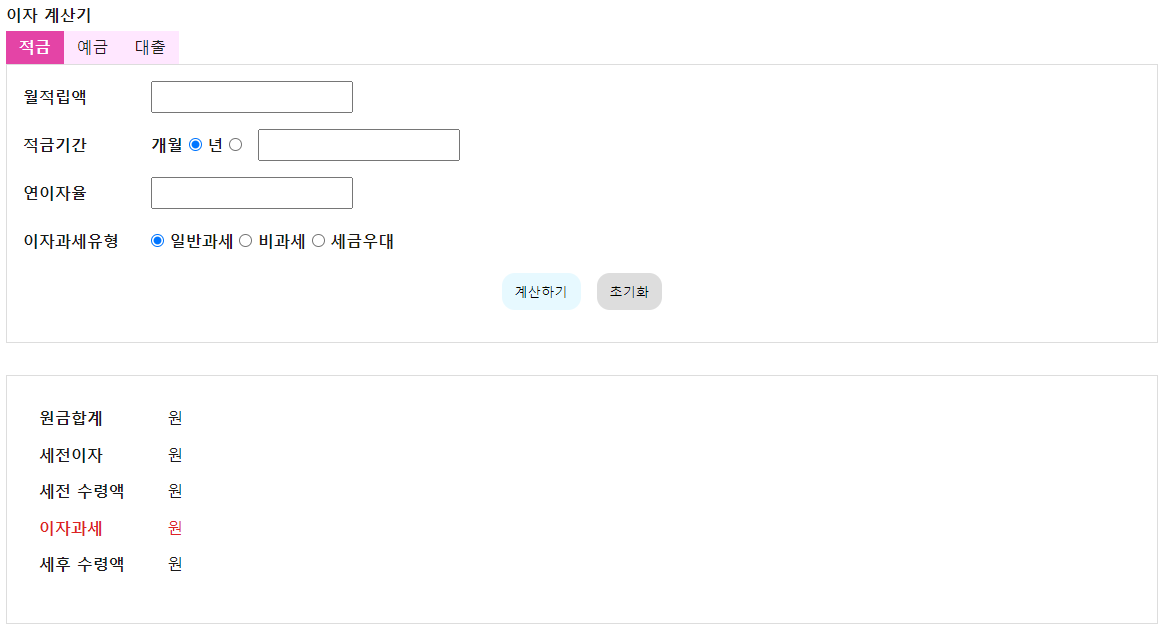
크게 디자인에 힘을 주진 않았지만,
컬러 등 공통적인 부분은 변수로 선언해서 사용하는 버릇을 들이고있다.
적금, 예금, 대출 탭과 각각의 숫자를 적을 수 있는 form을 만들고,
기본적으로 display:none이되 class on 이 있을 때 display:block을 주었다.
머리아픈 계산식에 앞서 JavaScript로(jquery 사용이 아닌!) tab기능을 만들어보자.
[ tab 기능 with JavaScript not jQuery ]
const tabs = document.querySelectorAll(".type-finance li");
const forms = document.querySelectorAll("form");
우선 tabs들을 선택한다. querySelectorAll을 통해 .type-finance li 엘리먼트들의 배열을 가져온다.
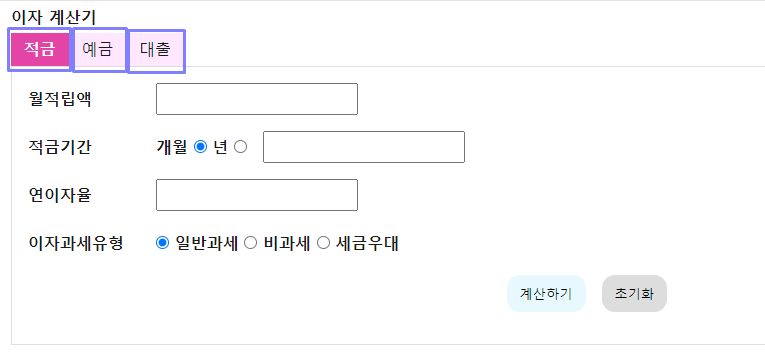
저 보라색 네모네모가 각각 .type-finance li이다.
그리고 form을 선택한다. 마찬가지로 querySelectorAll을 통해 form 엘리먼트들의 배열을 가져온다.
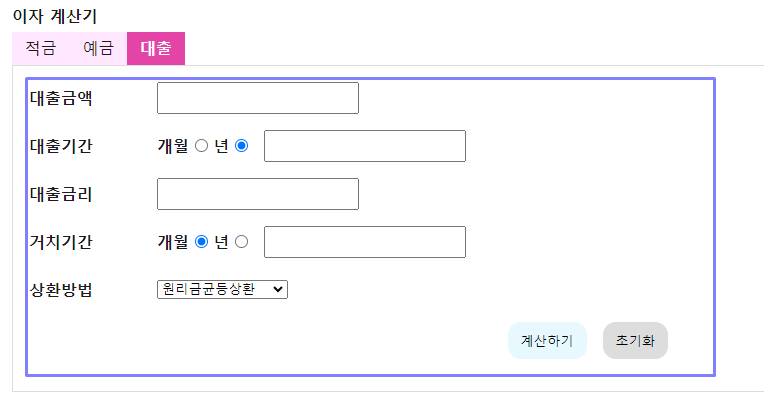
form 영역은 얘네들이다. 적금, 예금, 대출별로 따로있다.
tab과 그에 상응하는 콘텐츠 form은 그 개수가 같다.
tab기능을 만드는 여러가지 방법이 있겠지만, 자주 사용하는 for문을 사용하여 tab의 순서에 맞춰서 form을 보여주는 형식으로 하겠다.
for (let i = 0; i < tabs.length; i++) {
  tabs[i].querySelector(".tab").addEventListener("click", function (e) {
    e.preventDefault();

    for (let j = 0; j < tabs.length; j++) {
      tabs[j].classList.remove("on");
      forms[j].classList.remove("on");
    }
    this.parentNode.classList.add("on");
    forms[i].classList.add("on");
  });
}
i가 0이고, querySelctorAll로 가져온 배열 tabs의 길이보다 작을 때, i는 1씩 증가한다.
이 때 tabs[i]번째 엘리먼트에서 .tab 엘리먼트를 가져와서 ( => li 안에 있는 tab을 클래스로 가지고 있는 a 태그),
해당 엘리먼트 각각을클릭했을 때 이벤트가 발생하도록 한다.
a태그를 클릭하면 페이지가 리로드되는 현상이 발생하므로 e.preventDefault()를 통해 페이지 리로드를 막아준다.
그리고 for문 안에서 다시 for문을 사용해서,
tab[j]번째 마다 클래스 on을 삭제하고, 마찬가지로 form[j]번째마다 클래스 on을 삭제해준다.
이는 html 상에 미리 예금에 해당하는 .type-finance li와 form에 on을 작성해놓아서, 이 부분을 먼저 제거해주는 작업이 필요하기 때문이다.
그리고 난 다음에 비로소 클릭했던(this)의 부모 노드를 찾아가서 클래스 on을 붙여준다.
클릭했던 this는 a.tab이고, 그 부모 노드는 .type-finance li이다.
마찬가지로 클릭했던 a.tab의 순서에 상응하는 form 태그에도 클래스 on을 붙여준다.
이 방식을 할 때 주의할 점이라면,
tab의 순서에 맞춰 그에 상응하는 콘텐츠를 작성해야한다는 점 일 것이다.
클릭했던 this 즉 a태그에 직접 on을 붙여도 될텐데? 싶을 수도 있지만,
굳이 a태그를 감싸는 li에 on을 붙이고 선택된 모습을 시각적으로 표현한 이유는
보통 gnb만들 때의 버릇이 남아서이다.
사족으로 이야기하자면
<ul class="gnb-1depth">
	<li>
    	<a href="/location">Location</a>
            <ul class="gnb-2depth">
                <li>
                    <a href="/heaundae">Heaundae</a>
                </li>
                <li>
                    <a href="/gwangalli">Gwangalli</a>
                </li>
                <li>
                    <a href="/songjeong">Songjeong</a>
                </li>
            </ul>
    </li>
</ul>
Location이라는 메뉴명 위에 호버했을 때 하위메뉴인 해운대, 광안리, 송정이 보이게끔 하고싶다면
개인적으로 a가 아닌 그 상위인 .gnb-1depth > li에 클래스를 넣어줌으로써 제어를 한다.
왜냐하면 a:hover, a:focus일 경우 그 a 영역에 더이상 호버 및 포커스 하지 않는다면,
하위 메뉴인 .gnb-2depth가 사라져버리기 때문이다.
하지만 a를 감싸는 li영역에 클래스를 넣어주면, a 영역 밖(대신 li영역 안)으로 마우스나 포커스가 나가더라도
함께 감싸고 있는 .gnb-2depth까지 안정적으로 제어할 수 있다.
(접근성 할 때 많이 발견했던 오류였다)
사족 2로,
저 js코드에서 접근성을 조금 더 향상시킨다면,
클래스 on을 없앨 때 attribute("title", "선택됨")도 같이 없애고,
클래스 on을 붙일 때 attribute("title", "선택됨")도 같이 붙이면 접근성을 개선할 수 있다.
'Study with me' 카테고리의 다른 글
| [JavaScript] 이자계산기 만들기(feat. input value, switch, tab) - part 3. input[type="radio"] 에 따른 디자인 변화 (0) | 2023.07.04 |
|---|---|
| [JavaScript] 이자계산기 만들기(feat. input value, switch, tab) - part 2. input 숫자 세자리 마다 쉼표 붙이기 (0) | 2023.07.04 |
| [Redux] Redux, Redux-toolkit 기본 세팅 및 count 예제 (0) | 2023.02.09 |
| [React] Infinite Scroll in React with React-Query (0) | 2023.02.07 |
| [React] 엘리먼트의 y 좌표값 찾는 법 w/ TypeScript (0) | 2023.01.31 |


